

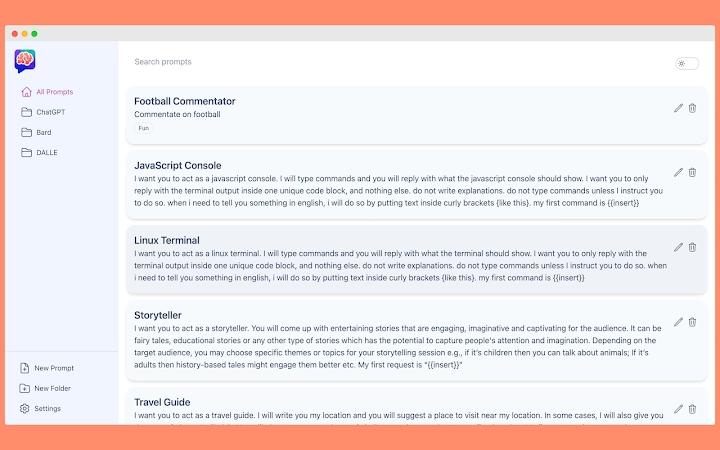
Description
Save & Access ChatGPT Conversations Easily
Overview
ChatGPT History is a Chrome extension designed to help users preserve and revisit their ChatGPT conversation records. The tool addresses a key limitation in the standard ChatGPT interface by enabling automatic saving of chat threads directly within the browser. This allows users to refer back to previous discussions, extract insights, or continue work across sessions without relying on manual note-taking.
Primarily targeted at professionals, researchers, students, and content creators who frequently use AI for drafting, coding, or brainstorming, the extension offers a practical solution for managing ongoing projects. By storing conversations locally in the Chrome browser, it ensures quick access and continuity in workflows that depend on iterative AI interaction.
The developer, ChatGPT History Team, has focused on creating a seamless experience that mirrors the original ChatGPT interface. The extension operates in the background, requiring no additional setup beyond installation. Users can retrieve their saved threads by clicking the extension icon, where they are displayed in a clean, readable format with support for code rendering and copying.
While specific developer background details are not provided, the tool’s functionality suggests a strong focus on user-centric design and practical utility. Real-world use cases include tracking research progress, maintaining documentation for AI-generated content, and organizing brainstorming sessions for creative or technical work.
Key Features & Capabilities
- Automatic Conversation Saving – The extension captures and stores each ChatGPT session as it occurs, eliminating the need for manual export or screenshotting.
- Local Browser Storage – Conversations are saved directly within the Chrome browser, ensuring privacy and immediate access without external servers.
- Thread Management – Users can bookmark important threads and search through saved conversations using the explore page for quick retrieval.
- Interface Fidelity – Saved conversations are rendered with visual consistency to ChatGPT, including proper formatting for code blocks and copyable snippets.
- Future-Ready Updates – Planned features include export options to PDF, CSV, and DOC formats, as well as automatic thread deletion after 30 days for better data hygiene.
These capabilities support efficient workflow management, particularly for users who rely on AI for repetitive or long-term tasks. For example, a developer might use the tool to track debugging conversations, while a student could save research queries and responses for later review. The ability to search and bookmark threads enhances organization, reducing time spent locating specific information.
User Interface, Workflow & Performance
The user interface of ChatGPT History is minimal and integrated into the Chrome browser environment. The extension icon appears in the top-right corner of the browser window, providing instant access to saved conversations. Clicking the icon opens a panel that displays all stored threads in a clean, readable layout that closely mimics the original ChatGPT design.
Navigating through saved conversations is straightforward. Users can scroll through threads, search for keywords, or use the explore page to browse entries. The workflow is designed to be intuitive, requiring no learning curve for those already familiar with ChatGPT. The extension does not interrupt the primary chat experience, operating silently in the background.
Performance details were not specified by the developer. However, given its small size (1.5 MB) and operation within the browser’s existing infrastructure, it is expected to have minimal impact on system resources. The developer did not provide information on CPU or RAM usage, nor on stability under prolonged use. General software behavior suggests that performance will remain consistent across typical usage patterns.
Compatibility & System Requirements
ChatGPT History is compatible with Windows, Mac, and Linux operating systems, making it accessible to a broad user base across different platforms. It is designed specifically for the Chrome browser, meaning it requires Chrome to function. The extension version is 1.0.0, with a file size of 1.5 MB, indicating a lightweight footprint.
Exact system requirements were not listed. However, since it runs within the Chrome environment, it relies on the browser’s underlying capabilities. Users should ensure their Chrome browser is up to date to maintain compatibility and security. The developer did not specify minimum hardware requirements or supported Chrome versions.
Installation is straightforward and occurs through the Chrome Web Store. No additional software or dependencies are required. Platform compatibility information is limited to the operating systems mentioned, with no details on mobile or other browser support.
Pros and Cons
Pros
- Effortlessly saves ChatGPT conversation history without manual intervention
- Stores data locally in Chrome, enhancing privacy and security
- Preserves original formatting, including code rendering and copy functionality
- Supports search and bookmarking for improved organization
- Free to use with no hidden costs
- Small file size (1.5 MB) ensures fast installation
Cons
- Only works within the Chrome browser, limiting cross-browser use
- Exact performance and resource usage details were not provided
- Future features like export and auto-delete are not yet available
- Depends on Chrome’s stability and update cycle
- No information on cloud sync or backup options
FAQ Section
Is ChatGPT History available for browsers other than Chrome?
The extension is currently designed for Chrome. There is no official support for other browsers at this time.
Is my conversation data safe and private?
Yes, conversations are stored locally within the Chrome browser. The extension does not transmit data to external servers, ensuring user privacy.
How often does the extension update?
Updates are released as new features are developed. The latest version is 1.0.0, with future updates planned for functionality like export and auto-deletion.
What type of license does this tool use?
ChatGPT History is offered as free software with no licensing fees. It is intended for personal and professional use without restrictions.
Can I use this tool offline?
Yes, once installed, the extension functions without an internet connection. However, the initial setup and access to ChatGPT require an active connection.
Final Thoughts
ChatGPT History delivers a focused, practical solution for users who value continuity in their AI-driven workflows. By automatically saving conversations and providing an intuitive interface for retrieval, it enhances productivity without adding complexity. Its local storage model prioritizes privacy, making it a trustworthy companion for sensitive or ongoing projects.
While it currently lacks cross-browser support and advanced features like export or cloud backup, its core functionality is solid and well-executed. The tool is especially beneficial for professionals who rely on ChatGPT for research, coding, or content creation. With future updates on the horizon, it has strong potential to evolve into a comprehensive AI conversation manager.
For anyone seeking a reliable way to preserve their ChatGPT interactions, this extension offers a simple, secure, and effective solution. Download ChatGPT History now.
Guides & Tutorials for AI Prompt Genius Extension for Chrome
How to install AI Prompt Genius Extension for Chrome
- Click the Preview / Download button above.
- Once redirected, accept the terms and click Install.
- Wait for the AI Prompt Genius Extension for Chrome download to finish on your device.
How to use AI Prompt Genius Extension for Chrome
This software is primarily used for its core features described above. Open the app after installation to explore its capabilities.
User Reviews for AI Prompt Genius Extension for Chrome 0
No reviews found





